Dev Log 15 - Version 1.2: A Smarter Hint System, and New Advanced Techniques
A Completely Upgraded Hint System
Version 1.2 brings a major upgrade to the hint system, making it easier than ever to learn advanced Sudoku techniques while you play.
Layered Hint Mechanism
The new system works like this:
- First click on the hint button: shows a guided hint with the technique name and partial highlights to help players identify the right solving direction
- Second click on the hint button: shows the full elimination logic and complete highlights
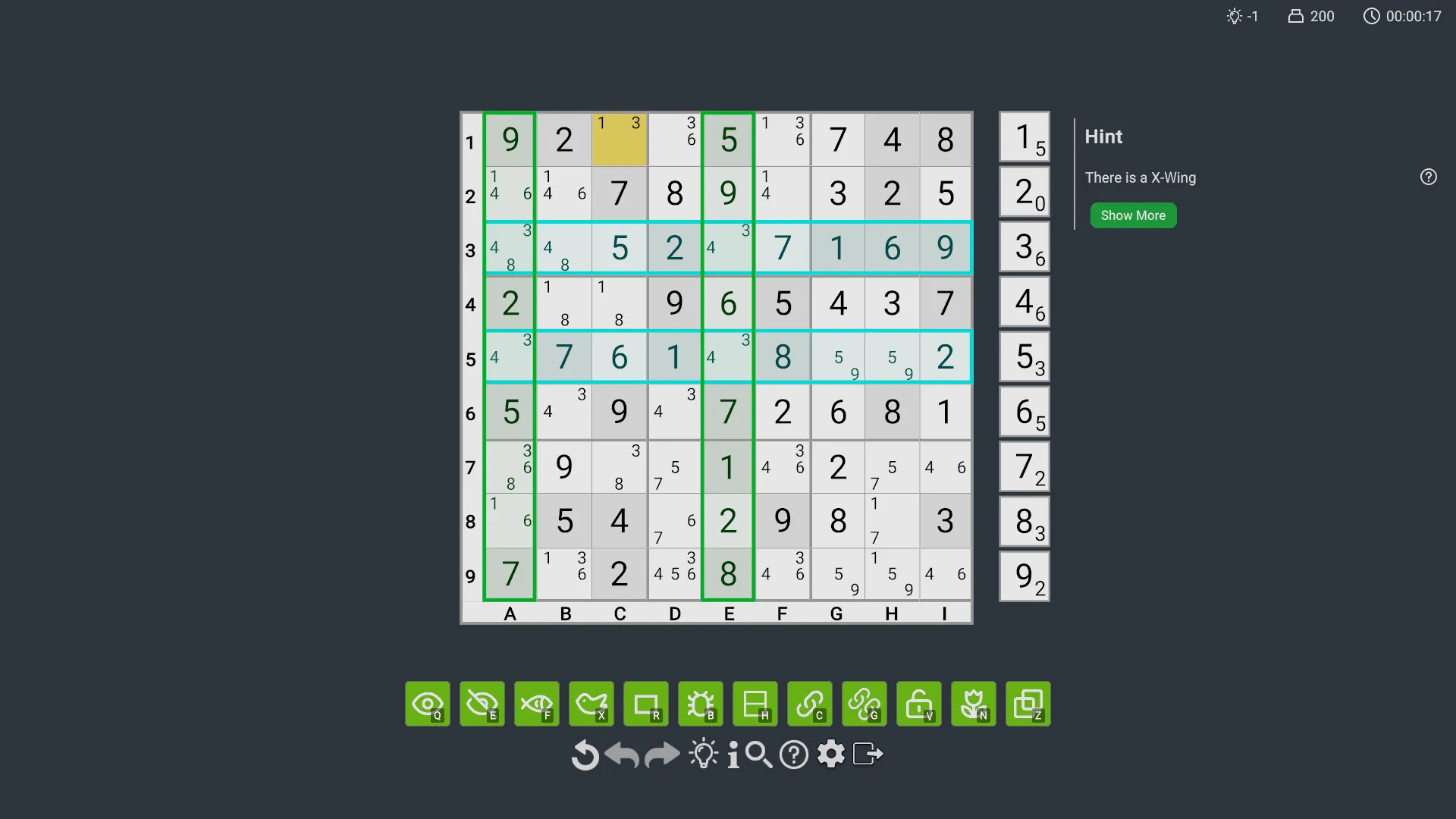
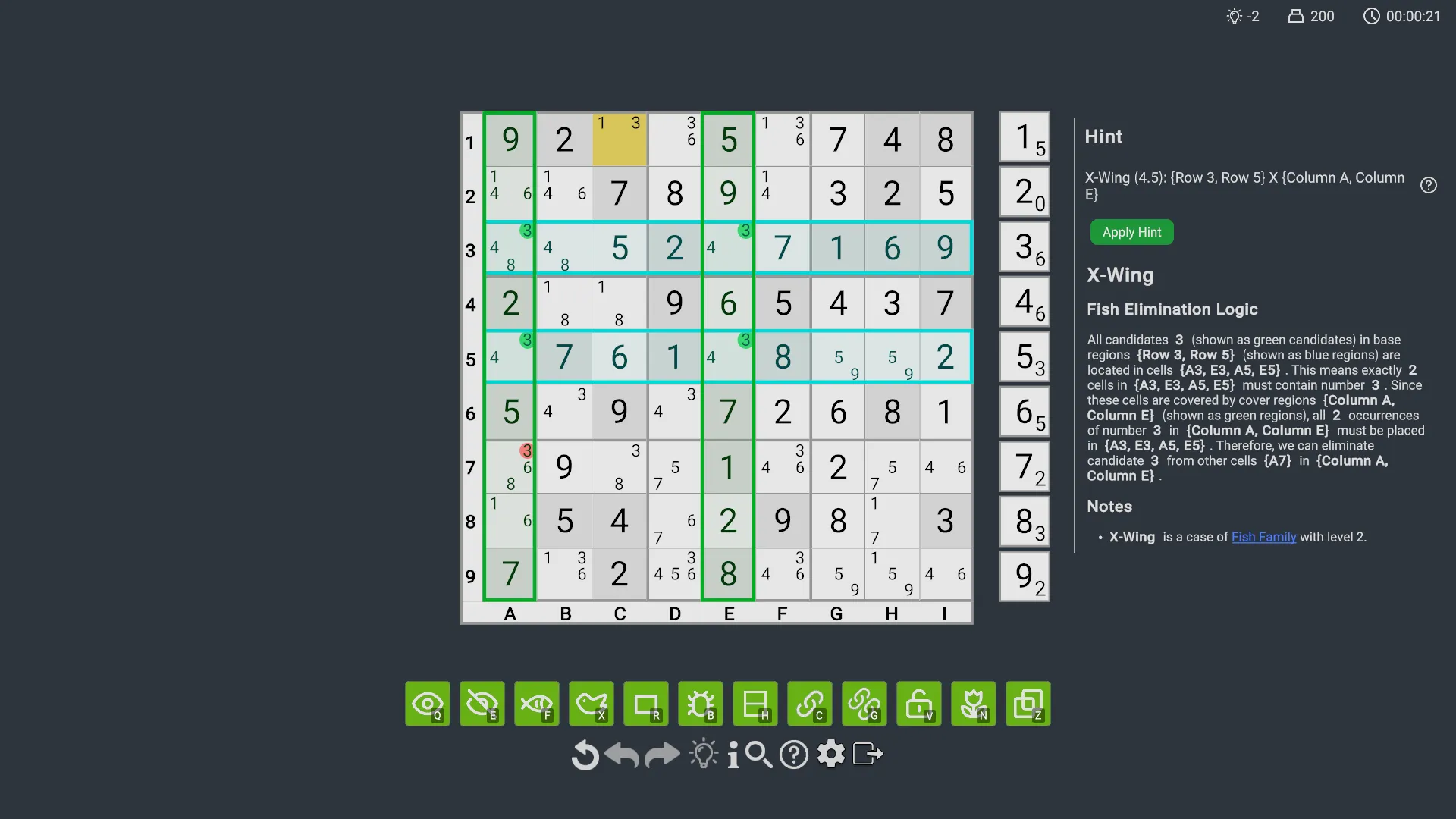
Instead of switching away to the Analyze screen just to understand a technique, players can now learn directly from the gameplay screen. The result is a smoother, more intuitive learning experience that keeps the focus on solving.
Normal Puzzles Now Allow Up to 3 Hints
Normal puzzles, meaning full puzzles rather than partial ones, now allow up to 3 hints without counting as a failure. This makes puzzles far more approachable for new players, letting them learn as they play with much less frustration.
Even after those hints are used up, the hint feature remains available without limit, though the puzzle will then be marked as failed. That means even on very difficult puzzles, players never have to leave the gameplay screen just to figure out what comes next. They can stay in the moment, keep learning, and continue solving without breaking the flow.
Support for Viewing Detailed Hints for the Previous Step
We also improved the hint review flow in response to feedback that the elimination results of some skills, especially the Chain skill, did not always match player expectations:
- After clicking Undo, players can now review the detailed elimination logic of the technique used in the previous step
Once they have reviewed it, they can click Redo to return to the current state.
New Advanced Solving Techniques
This is the most technically challenging part of the update. After 2 months of coding, testing, and optimization, we are introducing three advanced technique groups that are widely used by experienced solvers. With these additions, the solver now meets the needs of 95% of Sudoku players.
Unique Loops
Unique Loops are advanced techniques based on the assumption that a puzzle has a unique solution. They eliminate candidates by identifying specific loop structures. Our implementation is especially comprehensive and even includes Avoidable Loops. We may be the first Sudoku game to support Avoidable Loops.
This group includes:
- Unique Loop Type 1
- Unique Loop Type 2
- Unique Loop Type 3
- Unique Loop Type 4
- Unique Loop Type 6
- Hidden Unique Loop
- Avoidable Loop Type 1
- Avoidable Loop Type 2
- Avoidable Loop Type 3
- Avoidable Loop Type 4
- Avoidable Loop Type 6
- Hidden Avoidable Loop
- Missing Loop Type 1
- Missing Loop Type 2
- Missing Loop Type 3
- Missing Loop Type 4
- Missing Loop Type 6
- Hidden Missing Loop
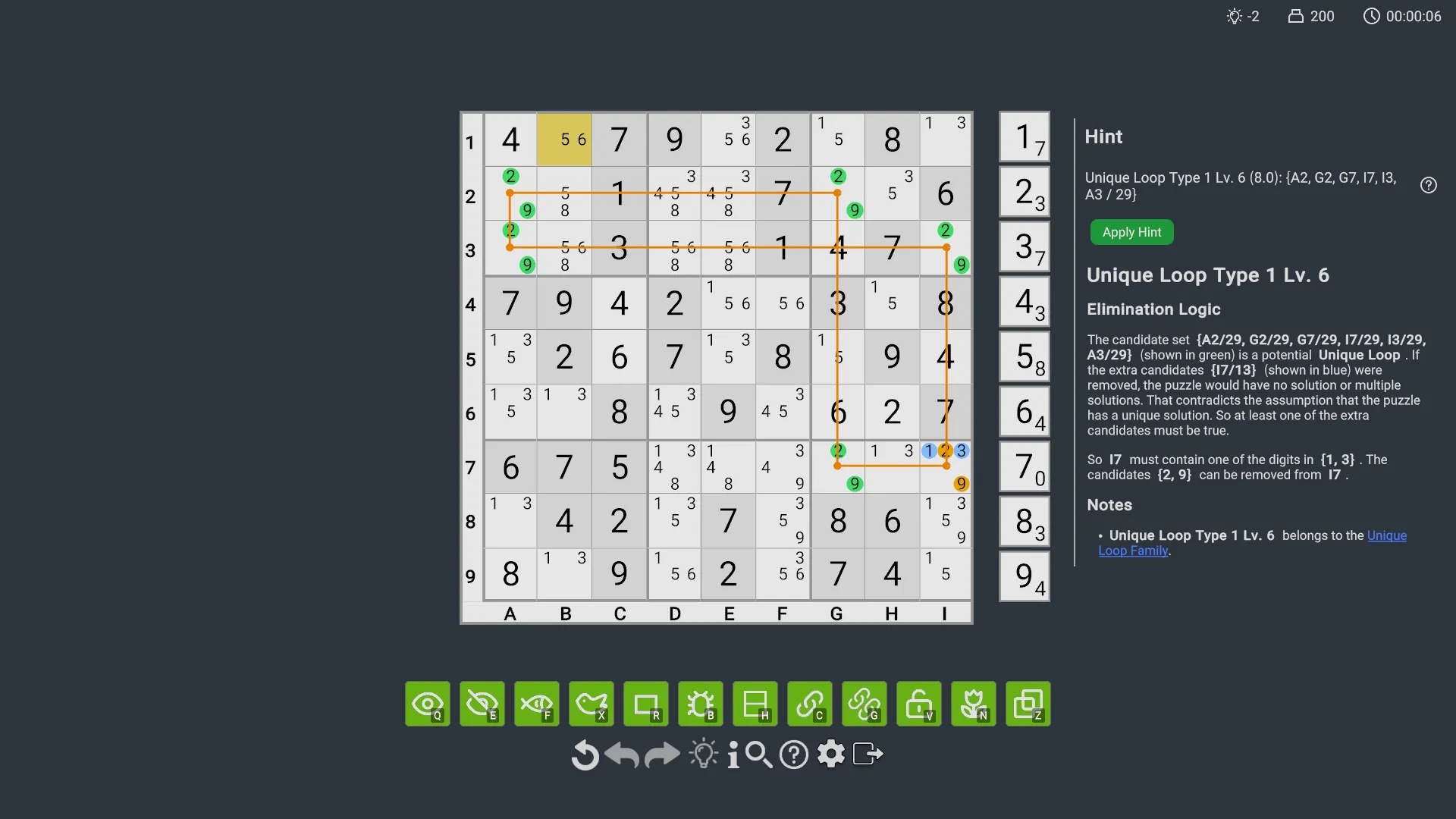
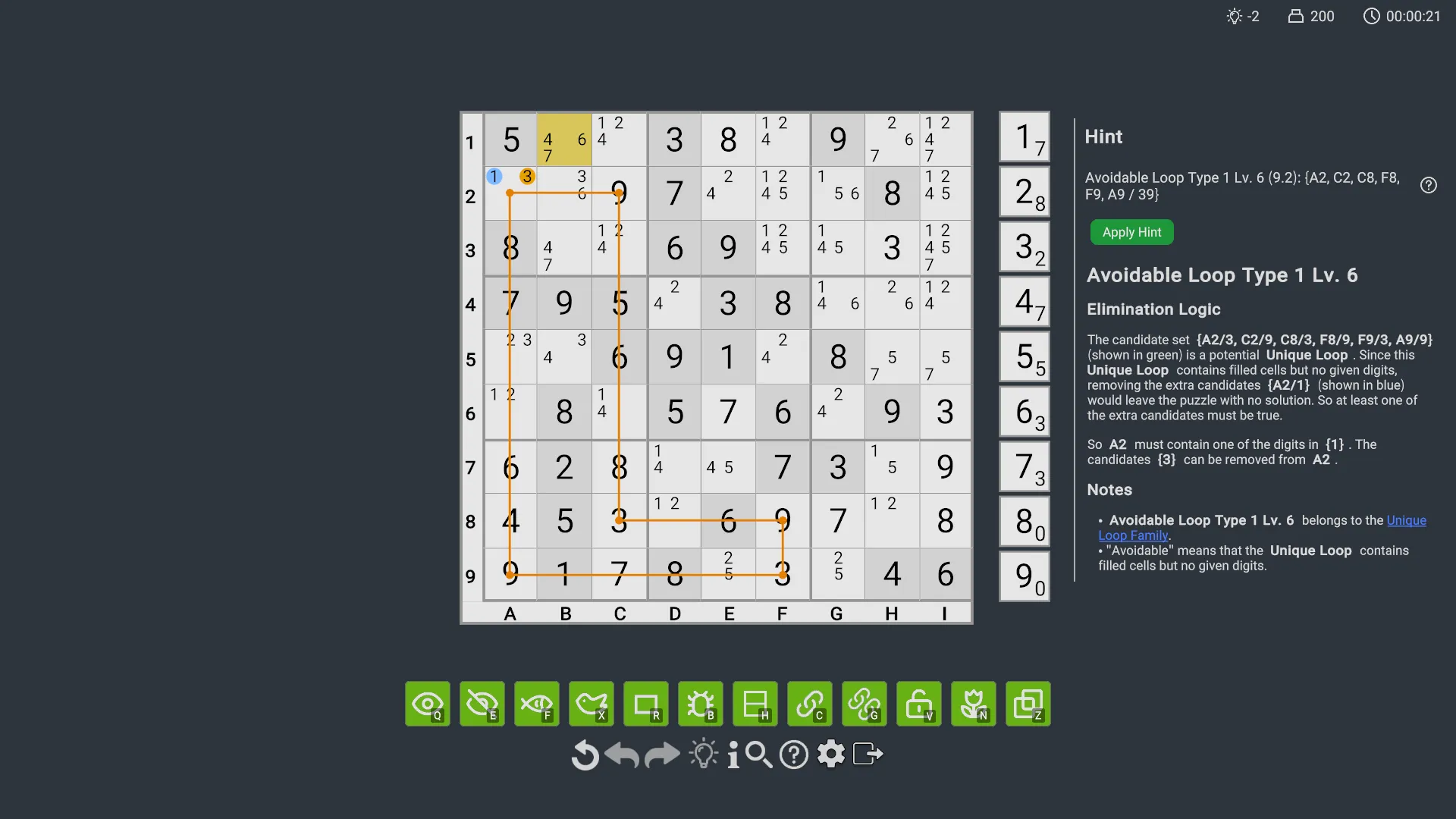
Here, “Missing” is a special term used in our game. It means that the structure contains no solved digits, but its candidates are already incomplete. If extra candidates are eliminated, the puzzle would become unsolvable.
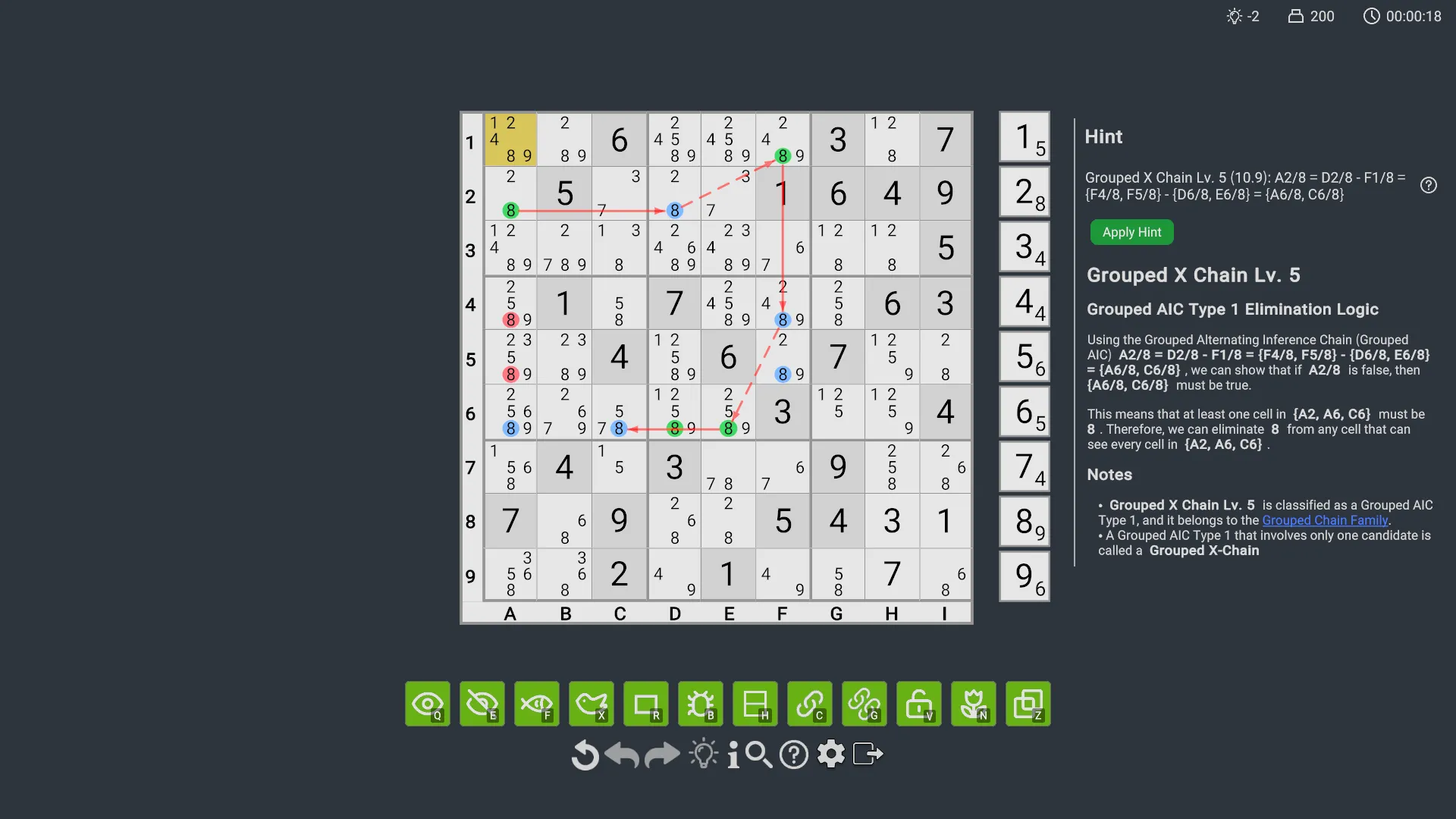
Grouped Chains
Grouped Chains allow groups of candidates to be used as nodes in a chain, greatly expanding the reach of chain techniques. This opens the door to far more powerful deductions than standard chains alone. This update also includes special grouped-chain cases such as Empty Rectangle.
This group includes:
- Grouped AIC Type 1
- Grouped AIC Type 2
- Grouped Discontinuous Loop
- Grouped Continuous Loop
- Grouped X Chain
- Empty Rectangle
Extended Rectangle
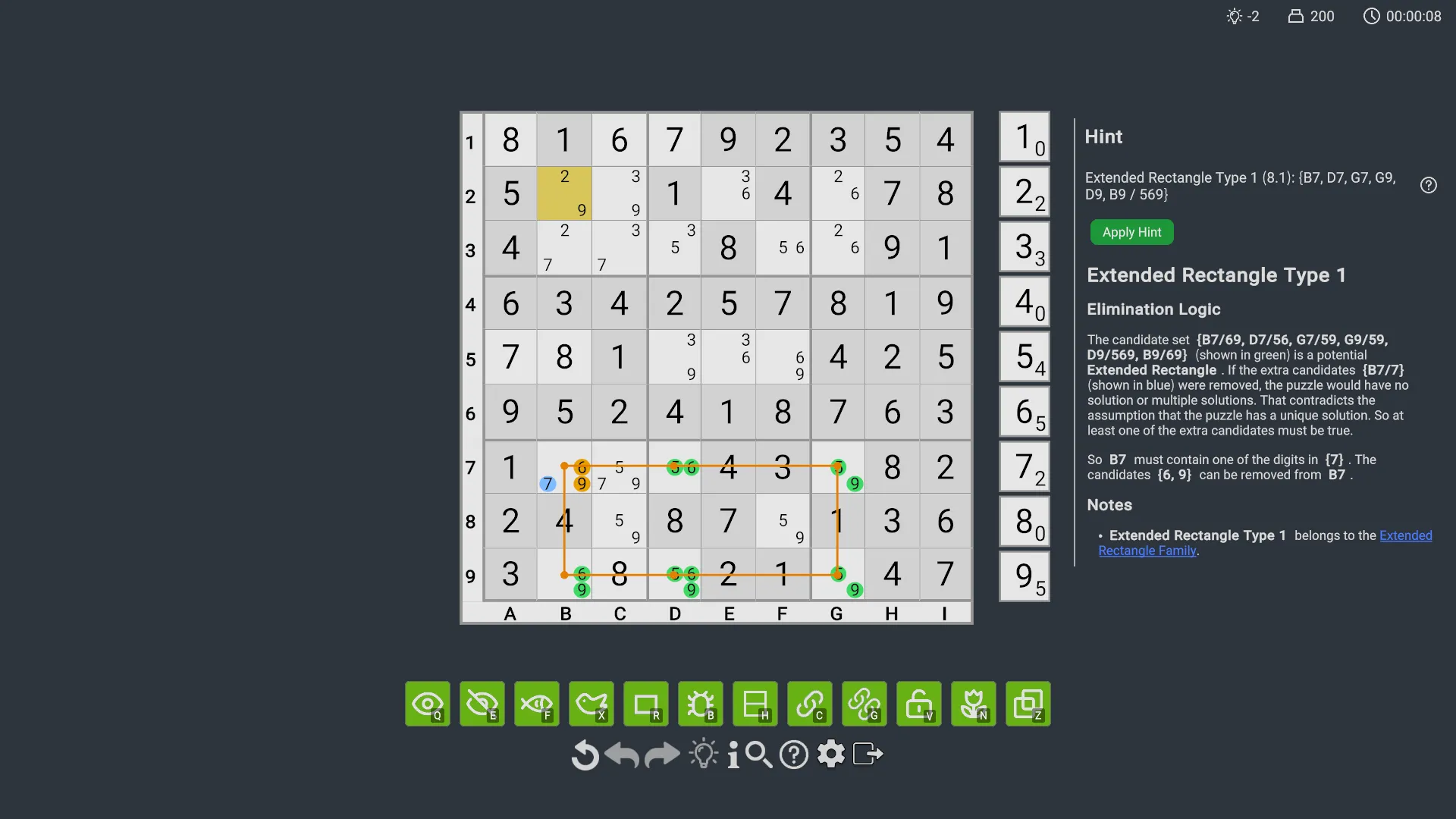
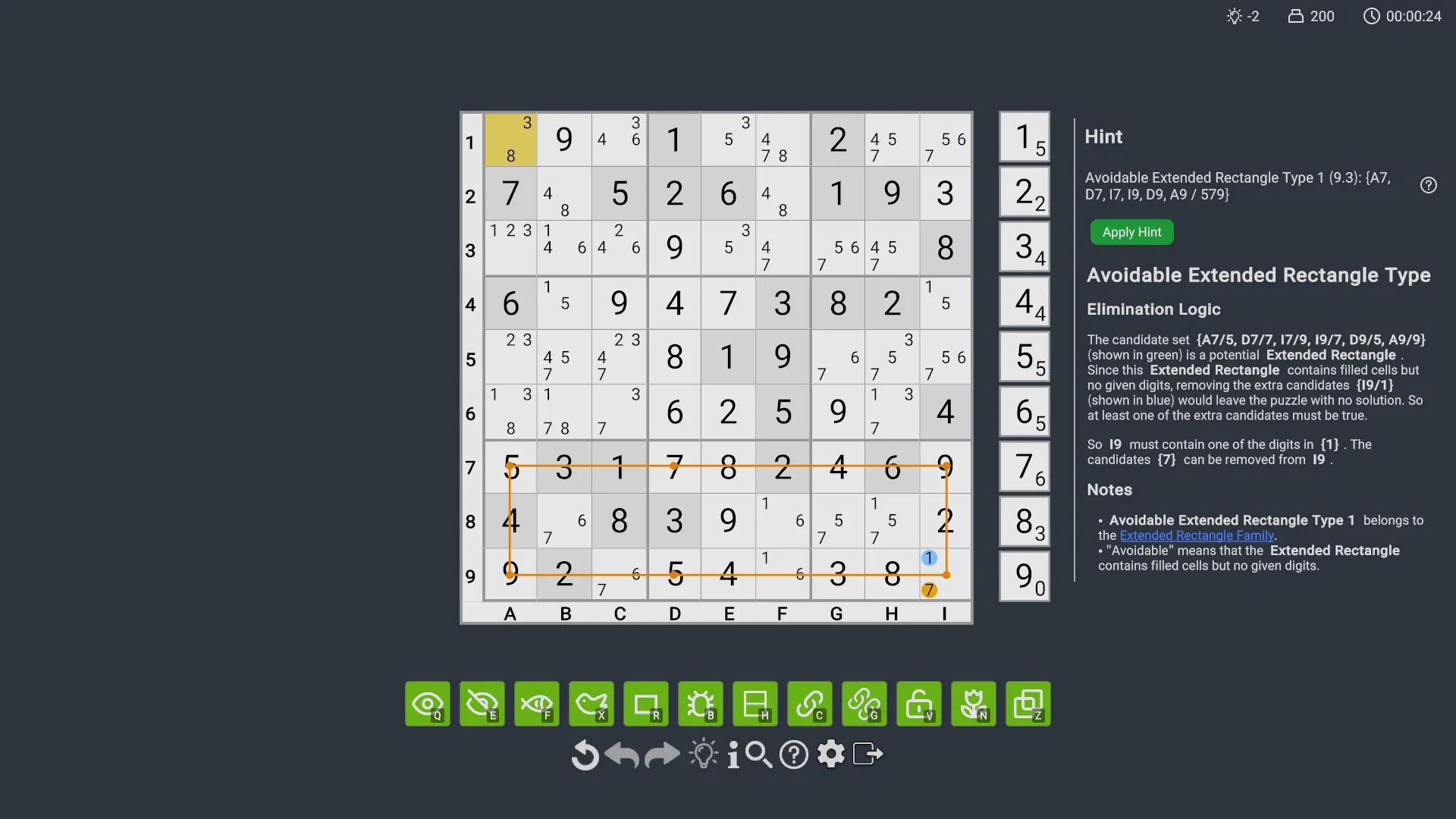
Extended Rectangle is a generalized form of Unique Rectangle. This update includes subtypes such as Avoidable Extended Rectangle, and we may be the first Sudoku game to support Avoidable Extended Rectangle. Together, these variants make the rectangle family much more complete than before.
This group includes:
- Extended Rectangle Type 1
- Extended Rectangle Type 2
- Extended Rectangle Type 3
- Extended Rectangle Type 4
- Extended Rectangle Type 6
- Hidden Extended Rectangle
- Avoidable Extended Rectangle Type 1
- Avoidable Extended Rectangle Type 2
- Avoidable Extended Rectangle Type 3
- Avoidable Extended Rectangle Type 4
- Avoidable Extended Rectangle Type 6
- Hidden Avoidable Extended Rectangle
- Missing Extended Rectangle Type 1
- Missing Extended Rectangle Type 2
- Missing Extended Rectangle Type 3
- Missing Extended Rectangle Type 4
- Missing Extended Rectangle Type 6
- Hidden Missing Extended Rectangle
Summary
The core goal of this update is simple: make Sudoku easier to learn without losing the depth that experienced players enjoy. By improving the hint system and expanding the technique library, we hope to deliver a solving experience that is more approachable, more educational, and more complete than ever before.
Thank you, as always, for your support and feedback. We hope you enjoy Version 1.2 and have fun exploring everything it adds.
Version 1.2.0 Patch Notes
New Features
- Layered hint system: the hint button in the gameplay screen now supports layered hints, showing a guided hint on the first click and full elimination logic on the second click
- Technique review after undo: after undoing, players can review the detailed elimination logic of the technique used in the previous step
- Advanced solving techniques: added three advanced technique groups, including Unique Loops, Grouped Chains (including Empty Rectangle), and Extended Rectangle
- New achievements: added achievements related to Unique Loops, Extended Rectangle, and Grouped Chains
- Multiple-solution puzzle support: the Analyze screen and Puzzle Editor now support puzzles with multiple solutions
- Analyze screen improvements: players can now copy the text of chains, grouped chains, and AIC chains for easier learning and sharing
Quality-of-Life Improvements
- Analyze screen scrolling improvement: fixed an issue where the list would automatically scroll to the bottom after generating a hint
- Analyze performance improvement: the Analyze screen now supports multithreaded analysis for better performance
Bug Fixes
- Fixed an issue where the Settings screen displayed incorrectly when first opened
- Fixed an issue where cell display became inconsistent after entering the Analyze screen from the Puzzle Editor and returning
- Fixed an issue where editing a puzzle in the Puzzle Editor and entering the Analyze screen multiple times could produce incorrect hints
- Fixed an issue where the puzzle completion status toggle on the level details page could still be interacted with
Technique Adjustments
- Removed the Remote Pair technique